|
SGT
Hardware
|
|
|
|
SGT-MAX™ Complete PC-to-telescope system
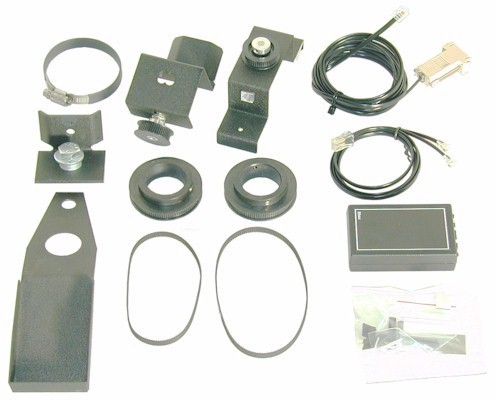
Includes serial interface box (B-Box), encoder
cable, encoders, mounting hardware, PC serial cable, a free B-Box mounting bracket and a free instructional video with a brief demonstration of TheSky
software. Does not include software (see software below).
(Please see
Read This Before Ordering.)
*
When ordering, please place a note in the shopping cart Comments area
identifying the specific telescope equipment you will be
installing the SGT-MAX on and provide a complete part number.
The
first portion of the part number is SGT. The second
portion identifies the specific equipment for which the
installation was designed.
This
information can be found in our Appendix
of Part Numbers by Manufacturer and Model. For
example, the part number for an SGT-MAX system for a Vixen Great
Polaris Mount would be SGTGPV.
This
Appendix also shows any special requirements including
additional information needed and specific equipment
requirements.
Also, be sure to Read
This Before Ordering.
|
|
|
|
|
|
SGT-MAX with Two Encoders
Kit includes B-Box, encoder cable, two encoders,
PC serial cable and a free B-Box mounting bracket and
a free instructional video with a brief demonstration of TheSky software.
The kit is designed for those who wish to build their own hardware for mounting
the encoders.
|
|
|
|
|
|
Serial
Encoder Interface Box (B-Box)
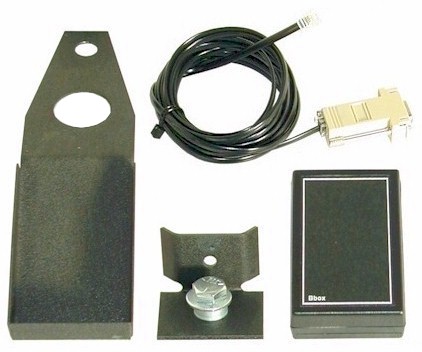
Includes serial interface box, PC serial interface cable, a free
B-Box
mounting bracket and a free instructional video with a brief demonstration of TheSky software.
The B-Box has an
on-off switch, an encoder cable jack, a serial cable jack and an LED.
|
|
|
|
SGT
Software
|
TheSky
Desktop Planetarium Software
Windows PC Version
NO LONGER AVAILABLE
|
|
|
TheSky™ Desktop Planetarium Software
JMI no longer carries Software Bisque's
products.
You can purchase TheSky directly from Software
Bisque.
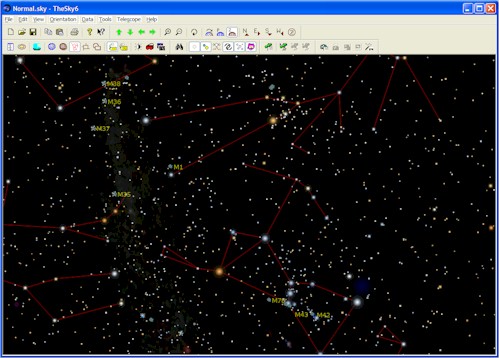
TheSky, created by Software Bisque,
accurately depicts the night sky for any date from 4713 B.C. to 10,000 A.D. for
any location on earth. The Professional and Serious Astronomer editions
will interface with a telescope using an SGT system (see hardware
above) and can slew some Go-To telescopes.
|
|
|
What is a Software
Guided Telescope?
Imagine every movement of your telescope
being represented against a realistic star field on the screen of your
personal computer! Simply type the name or catalog number of any
object you wish to see, and the SGT-MAX not only guides you to it, it even
shows your progress against the stars! The real-time link to your
telescope makes finding any of thousands, or even millions of objects, a
breeze. Combining it with a compatible Go-To telescope (such as the
Meade LX200) and CCD imaging software will give you a fully automated
imaging system.
It should be noted that without a compatible Go-To telescope, the SGT system
will guide you in a manner similar to the NGC
system in which you must manually move the telescope.
The Software Guided Telescope is a combination of two parts, Hardware and
Software. You will need both parts for a functioning
system. We sell TheSky software but many others will work
with our hardware.
See the list of telescopes
and mounts we outfit for the SGT system. For a better
understanding of a computerized telescope see our
Telescope Computer Tutorial. |
Customer
Comments
"I am getting a lot more enjoyment out
of my telescope since I can locate the various space objects so
easily. Even my wife is becoming more interested in looking through
the telescope." (E. F.)
|
|
Frequently Asked Questions
(FAQ)
|
|
Q. |
How is the
SGT system different from the NGC computers? |
| A. |
Planetarium
software, linked to the movement of a telescope, allows you to see where the telescope is
pointing by the use of a crosshair on a background of stars and non-stellar objects.
The software can guide you to any object in the database. In some cases, such
as the Meade LX200, it can use the Go-To function of the telescope to automatically
move to an object that you specify. In order to connect with planetarium software
you must have a serial interface device, such as JMI's B-Box, in addition to the normal
encoders and hardware. The SGT complete system includes the B-Box serial
interface and all necessary hardware, encoders and cables.
The
NGC-MAX Computer also includes a built-in serial interface that works just like the
B-Box.
Therefore, the NGC-MAX can work as a stand-alone system or in conjunction with a
personal computer and software. One of the advantages of using software is that you
can increase the database size from a few thousand to millions of objects.
To convert the NGC-MAX
Complete Installation to a Software Guided
Telescope (SGT) system, all you need to purchase is a Serial
Cable (Part No. CBLBBOX). This system can then interface to a PC
(with the internal B-Box emulator in the NGC-MAX) or work as a stand-alone
NGC-MAX guiding computer. |
| |
|
| Q. |
Can I
interface the MAX systems with my software? |
| A. |
In order to connect
with planetarium software you will need a serial interface device (see above). Some
of the software vendors sell their own interface hardware. Here is a partial list of
available software (and hardware) that will interface with JMI encoders: TheSky
(B-Box) by Software Bisque, Voyager II (SkyPilot) by Carina Software, Earth Centered
Universe, Deep Space (Deep Space Navigator) by David Chandler, Megastar, Starry
Night and Cartes du Ciel. |
|